
What is IPTV and how does it work?
Internet protocol television, or IPTV, delivers television and video using Internet Protocol networks rather than traditional terrestrial, satellite or cable broadcast signals. A viewing device requests or receives video data, and a compatible player turns that data into pictures and sound.
For resellers, the essential distinction is between the content service and the player software. The content service supplies authorized video access; the player provides the interface used to watch it. IPTVAPPREBRAND-BLT (BLT) customizes player software only and never provides channels, streams or content.
Does IPTV always use the public internet?
IPTV can operate across a managed private network or an internet connection. In traditional telecom deployments, providers control the delivery network and can prioritize television traffic. Internet-delivered services often travel over shared networks, where available bandwidth and congestion vary.
Strictly speaking, video delivered over the open internet is often described as over-the-top, or OTT, streaming. In everyday reseller conversations, however, “IPTV” commonly covers several kinds of IP-based television delivery. Understanding that distinction helps explain why different services can behave differently even when customers use the same player.
How does video reach the viewer?
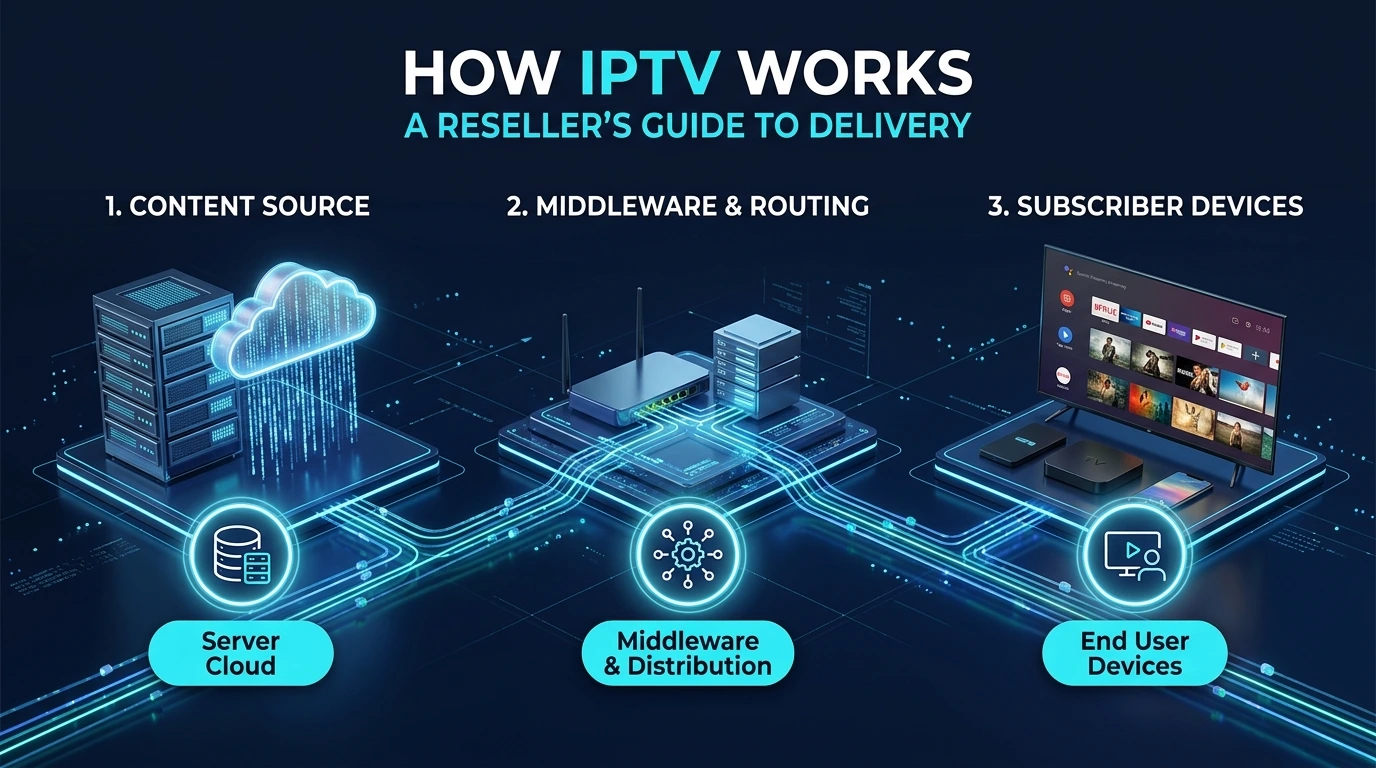
An IPTV delivery chain generally moves video from a source through processing and distribution systems to a playback device. Each stage has a separate job, and a problem at any stage can affect viewing.
- Ingestion: An authorized provider receives a live video feed or a stored video file.
- Encoding: Video and audio are compressed into formats suitable for delivery and playback.
- Packaging: The compressed media is prepared for a streaming protocol, often as small segments.
- Distribution: Servers deliver the media through a managed network or internet infrastructure.
- Playback: The app requests the media, buffers some data and uses the device’s decoding capabilities to display it.
This separation matters when troubleshooting. A redesigned app interface cannot repair a broken source feed or an overloaded delivery server.
What do codecs and streaming protocols do?
Codecs compress video and audio, while streaming protocols organize how that media reaches the player. These are related technologies, but they are not interchangeable.
H.264 and H.265, also called AVC and HEVC, are common video codecs. HEVC can deliver comparable visual quality at lower bitrates in suitable conditions, but playback support depends on the device, operating system and player implementation. Audio compatibility matters too: a device may display video but fail to decode its audio track.
HLS and MPEG-DASH commonly deliver media as sequences of short segments over HTTP. A manifest tells the player where those segments are and which versions are available. Some systems use other approaches, including RTP or UDP-based delivery. Compatibility must therefore be checked against the actual service, not assumed from an app’s name.
Why do buffering and playback delays happen?
Buffering happens when the player cannot obtain or process enough media to maintain continuous playback. Possible causes include inconsistent Wi-Fi, network congestion, server limitations, excessive bitrate or device decoding constraints.
Players keep a temporary buffer to absorb short interruptions. A larger buffer can improve resilience but may add delay, particularly for live television. Live latency can also come from encoding, packaging and distribution, so it is not solely an app setting.
Adaptive bitrate streaming can help when the service offers multiple quality levels. The player switches between available versions according to connection conditions and playback capabilities. It cannot create lower-bitrate alternatives that the provider has not supplied.
What are unicast, multicast and CDNs?
Unicast sends an individual delivery session to each viewer. It is widely used for internet streaming and supports personalized playback, including video on demand.
Multicast distributes a shared stream to multiple viewers within a network that supports it. Managed IPTV networks may use multicast to avoid sending separate copies of the same live channel across every shared network link.
A content delivery network, or CDN, distributes delivery across servers in different locations. For suitable streaming formats, edge servers can cache media segments and reduce demand on the origin server. A CDN supports distribution; it does not determine whether content is licensed or whether a player supports its format.
What does an IPTV player actually manage?
An IPTV player manages navigation, service access and playback rather than supplying the television itself. Depending on its implementation, it may support:
- Playlists: M3U files or URLs containing media entries and their locations.
- Service authentication: Provider-supported credentials, APIs or portal connections.
- Program guides: Schedule metadata, sometimes delivered through XMLTV.
- Playback controls: Features such as favorites, subtitles or audio-track selection.
An electronic program guide supplies schedule information, not video. Catch-up viewing also requires service-side support; a player button alone cannot make past broadcasts available.
What should resellers check before branding an app?
Resellers should verify service compatibility, target devices and navigation before choosing a branded player. Test authorized streams on representative Android, Android TV and Fire TV devices, including remote-control use, audio playback and guide loading.
BLT rebrands and customizes IPTV player software with a reseller’s logo, name and colors. Options and customization scope depend on the selected player, including supported Smarters, IBO, XCIPTV or TiviMate-based offerings. Discuss the exact app, platform and requirements with BLT through WhatsApp, where orders are handled. Branding creates a recognizable interface; content rights, stream delivery and service availability remain separate responsibilities.